The Anatomy of an AI: A Plain-English Guide to Models, Harnesses, and Everything in Between
Models, harnesses, providers, quantization — the AI landscape has a learning curve. Here's a plain-English guide to how the pieces fit together, using one simple analogy.
If you've started using AI tools beyond just ChatGPT, you've probably run into a wall of jargon. Models, harnesses, providers, inference, quantization, API keys, FP8 — it can feel like you need a computer science degree just to comparison shop.
You don't. But you do need a mental model for how the pieces fit together. So here's one: think of an AI system like a body.
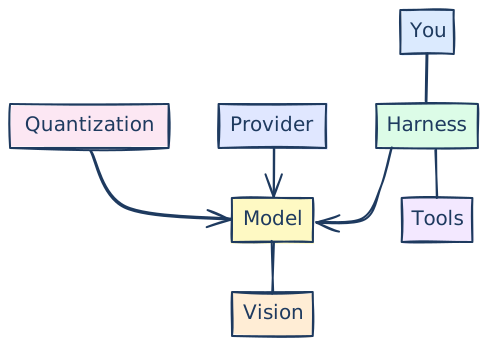
The Brain: The Model
The model is the brain. It's the thing that actually thinks — or does whatever the AI equivalent of thinking is. When someone says "Claude Opus 4.6" or "Kimi K2.5" or "GPT-4o," they're talking about a specific model. Each one was trained differently, has different strengths, and has its own personality (yes, they genuinely feel different to use).
The model is where the intelligence lives. It's what understands your question, reasons through a problem, and generates a response. Everything else in this list exists to give that brain a way to interact with you and the world.
Some brains are bigger and slower but more capable. Some are smaller and faster. Some are great at writing code. Some are better at creative work. Picking the right model matters, but it's only one piece of the puzzle.
The Skeleton: The Harness
If the model is the brain, the harness is the skeleton — the structure that holds everything together and determines what the brain can actually do.
A harness is the software you use to interact with a model. The same model can live inside very different harnesses, and the experience changes dramatically.
Take Claude Opus 4.6 as an example. You can use it through:
- The Claude Mac app — a chat interface, good for conversation, brainstorming, writing, quick tasks
- Claude Code — a command-line tool that can read and write files on your computer, run commands, and work as an autonomous coding agent
Same brain. Completely different capabilities. In the chat app, Claude can talk to you and generate text. In Claude Code, it can actually build software, edit your files, and take actions on your behalf. The harness determines what the brain has access to.
Another example: Kimi K2.5 is a model. You could use it through Kilo Code (a CLI tool, similar to Claude Code), through a VS Code extension, or through a web chat interface. Same model, different skeletons, different experience.
Other harnesses you might hear about: Cursor, Windsurf, GitHub Copilot, Aider, Open CLAW. Some of these let you swap in different models — so you're choosing a skeleton and then choosing which brain to put in it.
Arms and Legs: Tools
A brain in a skeleton can think, but it can't do anything in the physical world without limbs. Tools are the arms and legs.
When a model has access to tools, it can take actions: search the web, read files, write code, run commands, call APIs, create images, manage your calendar. Without tools, all it can do is listen and talk. With tools, it can actually go do things on your behalf.
This is a big part of what separates a basic chatbot from an AI agent. An agent is essentially a model with tools — a brain with arms and legs. Harnesses like Claude Code and Open CLAW are designed to give models a rich set of tools, which is why they feel so much more capable than a simple chat window.
Eyes: Vision
Some models can process images and video — they can "see." This is called multimodal capability, but you can just think of it as giving the brain eyes.
If a model has vision, you can show it a screenshot, a photo, a diagram, a chart, and it can understand what it's looking at. You can say "what's wrong with this design?" or "read the text in this image" or "describe what's happening in this photo" and it'll work.
Not every model has this. And the quality varies — some models see better than others. But it's increasingly standard, and if you're doing anything visual (design, debugging UI, analyzing charts), it matters a lot.
The Hospital: Providers
So who's keeping this body alive? That's the provider — the service that actually runs the model and gives you access to it.
Running an AI model requires serious hardware. We're talking about racks of expensive GPUs with massive amounts of memory. Most people don't have this sitting in their living room, so they access models through a provider — a company that has the hardware and sells you access to it.
You typically pay for this in one of two ways:
- A subscription — a flat monthly fee (like $20/month for Claude Pro) that gives you a certain amount of usage
- An API key — pay-per-use pricing where you're charged based on how much you send to and receive from the model. This is what developers use when building apps on top of AI.
"Inference" is the jargon for what happens when a model processes your input and generates a response. When people say "inference provider," they just mean "the company running the model for you." Anthropic runs Claude. OpenAI runs GPT. Google runs Gemini. But there are also third-party providers like OpenRouter, Amazon Bedrock, or Google Vertex that serve multiple models in one place — like a food court instead of a single restaurant.
Here's the thing not many people know: you can also run models locally, on your own computer. Tools like Ollama make this surprisingly easy. The catch is that you need a lot of RAM (or VRAM if you have a dedicated graphics card) to run anything decent. The bigger the model, the more memory you need. It's slower than cloud providers, and you're limited to smaller models, but it's free, private, and works offline.
Compression: Quantization
This is where it gets a little technical, but it's worth understanding because it directly affects what you get when you use a model.
Quantization is basically compression for AI models. A full-size model takes up a lot of memory and requires beefy hardware to run. Quantization makes the model smaller by reducing the precision of its internal numbers — think of it like converting a high-resolution photo to a lower resolution. The file gets smaller, but you lose some detail.
Why does this matter to you? Because different providers might serve the same model at different levels of quantization. Two services could both offer Kimi K2.5, but one is running it at full precision (FP16) and the other has quantized it down to FP8 or FP4 to save on hardware costs. The quantized version will be cheaper and possibly faster, but the quality of its responses will be worse — sometimes noticeably so.
If you've ever had an experience where the same model felt smart on one platform and dumb on another, this might be why. It's like the difference between a 4K video and a 480p stream of the same movie. Same content, very different experience.
When you're shopping for AI services on platforms like OpenRouter, you'll see these specifications listed. Now you know what they mean: higher precision (FP16, FP8) generally means better quality. More aggressive quantization (FP4, lower-bit variants) means smaller, faster, cheaper, but with a tradeoff in capability.
Putting It All Together
So when you use an AI tool, here's what's actually happening:
- A model (the brain) is doing the thinking
- Inside a harness (the skeleton) that determines what it can do
- With tools (arms and legs) that let it take actions
- Possibly with vision (eyes) to process images
- Running on a provider's hardware (the hospital keeping it alive)
- Possibly quantized (compressed) to fit on cheaper hardware or run faster
When someone says "I used Claude to build a pricing calculator," what they mean is: they used the Claude Opus model (brain), inside the Claude Mac app (skeleton), running on Anthropic's servers (provider). No tools needed for that one — just conversation.
When someone says "I used Claude Code to refactor my entire codebase," they mean: Claude Opus (brain), inside Claude Code (skeleton with arms and legs), with access to their file system and terminal (tools), running on Anthropic's servers (provider).
Same brain. Different body. Very different capabilities.
Why This Matters
You don't need to memorize any of this to use AI effectively. But understanding these layers helps you make better decisions:
- Choosing a model is choosing a brain. Different tasks benefit from different strengths.
- Choosing a harness is choosing what that brain can do. A chat app and a coding agent are very different experiences, even with the same model.
- Choosing a provider affects quality (quantization) and cost (subscription vs. API). The cheapest option isn't always running the same model you think it is.
- Giving a model tools is what turns it from a conversationalist into an assistant that can actually get things done.
The AI landscape moves fast, but this anatomy stays stable. Models come and go. Harnesses evolve. Providers compete on price. But the structure — brain, skeleton, arms, eyes, hospital — is how it all fits together, and understanding it puts you ahead of most people navigating this space right now.